Design agencies and modeling agencies don't usually hand over a single clean model photo, they hand over a setcard: one composite sheet with a portrait, a three-quarter, a full body front and back, sometimes more, all laid out on one page. Until now, using that in NotShot meant cropping each shot out yourself before you could upload anything. NotShot now reads the setcard directly.
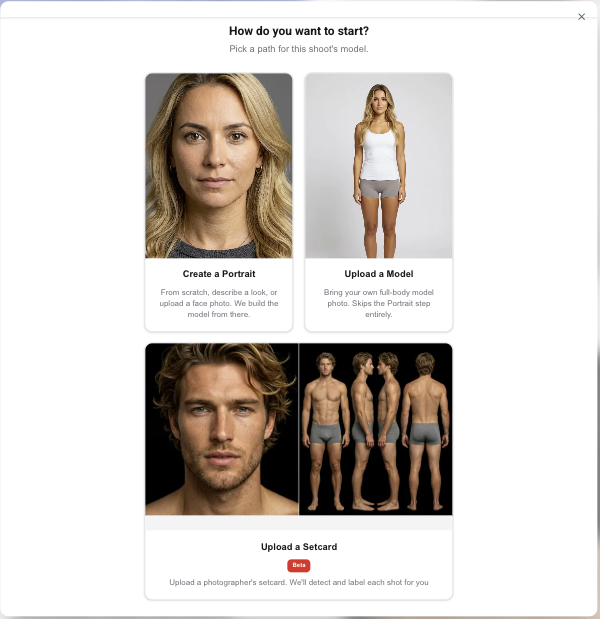
Upload the composite image as-is. NotShot detects the individual shots on the sheet and labels each one, portrait, upper body, full body front, full body back, and so on. You review the detected panels, adjust a crop or a label if anything needs correcting, and confirm. Each confirmed panel then becomes its own portrait or model asset in your account, ready to use in the wizard exactly like any photo you'd uploaded one at a time.
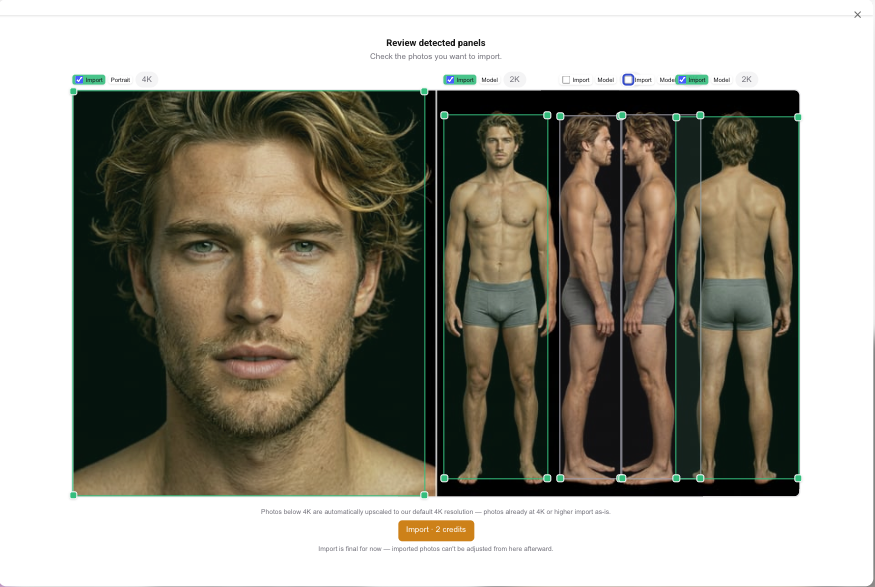
Setcards are just how a lot of talent gets handed to us already, an agency sends one composite file. Making a customer manually crop that file before they could even start a render was extra work NotShot could do for them instead, in the same spirit as the rest of the on-model workflow. This is a Beta feature, detection is good but not perfect on every layout, which is exactly why the review-and-confirm step exists before anything is generated.
Each confirmed panel goes through NotShot's normal generation, so what lands in your account is a real, usable portrait or model asset rather than a plain crop of the original photo. It's the same starting point you'd have from any other upload, with the same identity preservation across renders, ready to carry into an e-commerce or editorial shoot.
If you're onboarding a model for the first time either way, see how identity preservation works, or compare the cost against a traditional photoshoot.